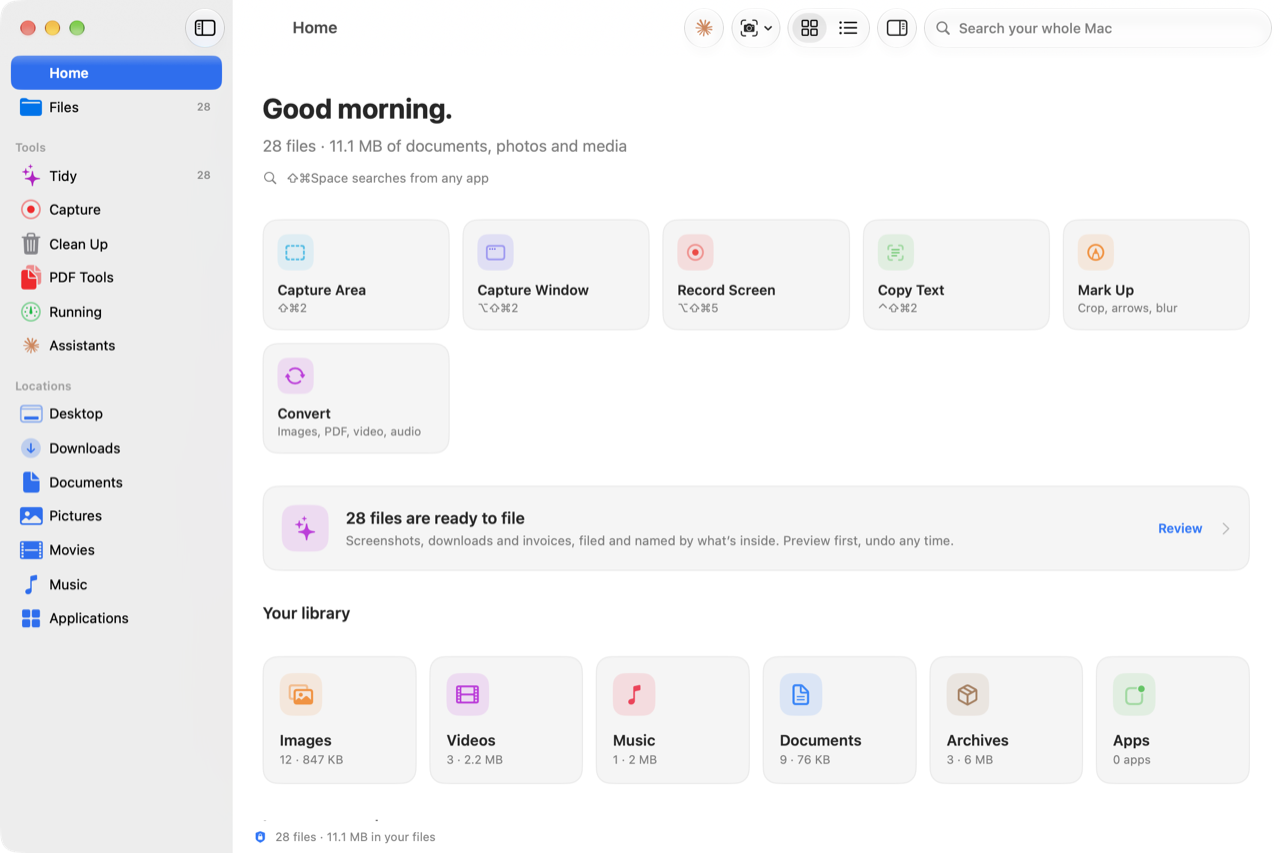
A screen recorder with sound, a screenshot and markup tool, PDF tools, a file converter, a desktop organiser and a duplicate finder. One native app that runs on your Mac, for $15 once.
The jobs you do every week, without five more apps.
Record, capture, convert, shrink, file and find, from one window, one menu bar item and a few keyboard shortcuts.
Screen recorder & screenshots
Record with system audio. Capture, mark up, send.
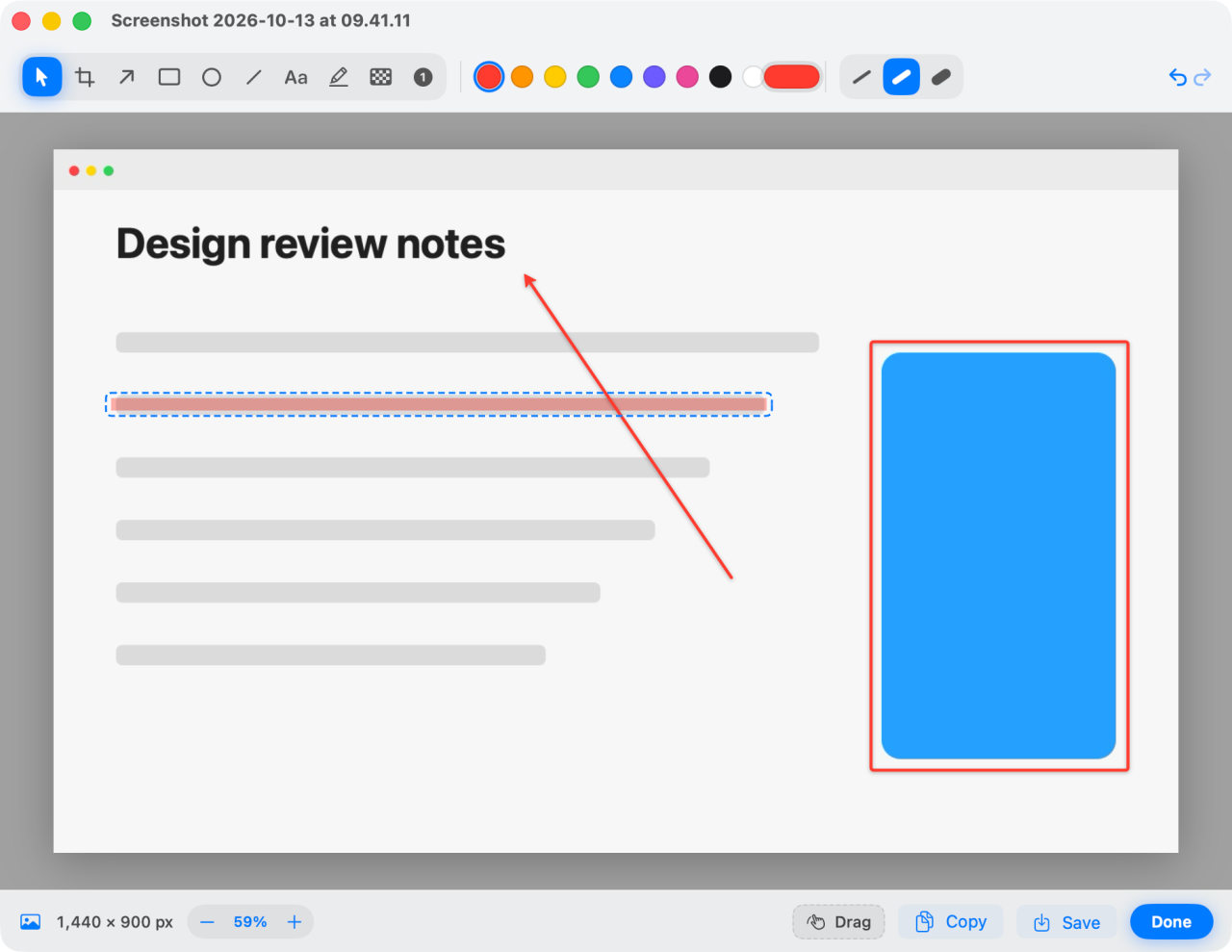
Record the whole screen, a window or an area with system audio and your microphone, pause, then trim it, make a GIF or compress it. Screenshots open in a markup editor with arrows, boxes, text, highlighter, blur and numbered steps.
MP4 with soundTrimGIFCopy text from screenBlur & pixelate
Shortcuts
A keystroke away, from any app.
Capture area
⇧⌘2
Capture window
⌥⇧⌘2
Copy text from screen
⌃⇧⌘2
Record the screen
⌥⇧⌘5
Microphone and click highlights need macOS 15 or later. macOS records whole windows, not single browser tabs.
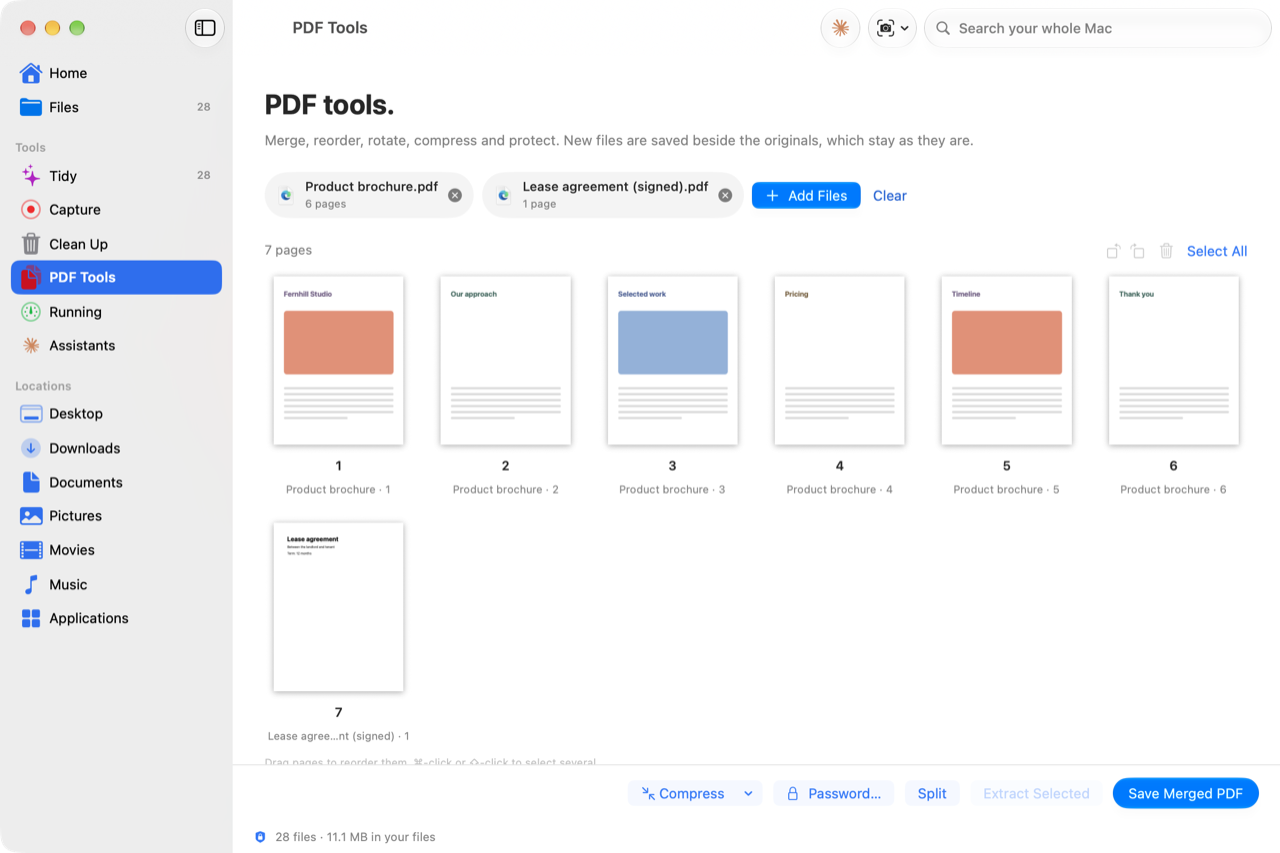
Combine, reorder, split, lock and compress PDFs, without uploading them.
Drop in PDFs and images and every page becomes a thumbnail you can drag, rotate or remove. Save one merged PDF, extract pages, split into single pages, add or remove a password. Compress tries several methods at three levels and only saves a result that is at least 5% smaller.
Combine PDFsCompress PDFSplit & extractPasswordImages to PDF
“pdfs from last week over 5 mb” becomes filters you can see. Text in documents and in screenshots on your Desktop and in Downloads is searchable too.
pdfs from last week over 5 mb
KindPDFModifiedLast weekSizeOver 5 MB
PDFBrand guidelines.pdfDocuments › Work12.4 MB
PDFQ3 board pack.pdfDesktop8.8 MB
PDFLease agreement (signed).pdfDownloads6.1 MB
Try
Sample files. Nothing on your Mac is read by this page.
File converter
Change any file’s format from Finder.
HEIC to JPG, PNG to JPG, MOV to MP4, PDF to images, Word or Markdown to PDF, plus compress, resize and strip location data. The original is never changed.
Porto rooftops.jpg
JPEG image · 3.2 MB
Right-click › Convert
Pick a format. Arrow keys and 1–8 work too.
Desktop & Downloads organiser
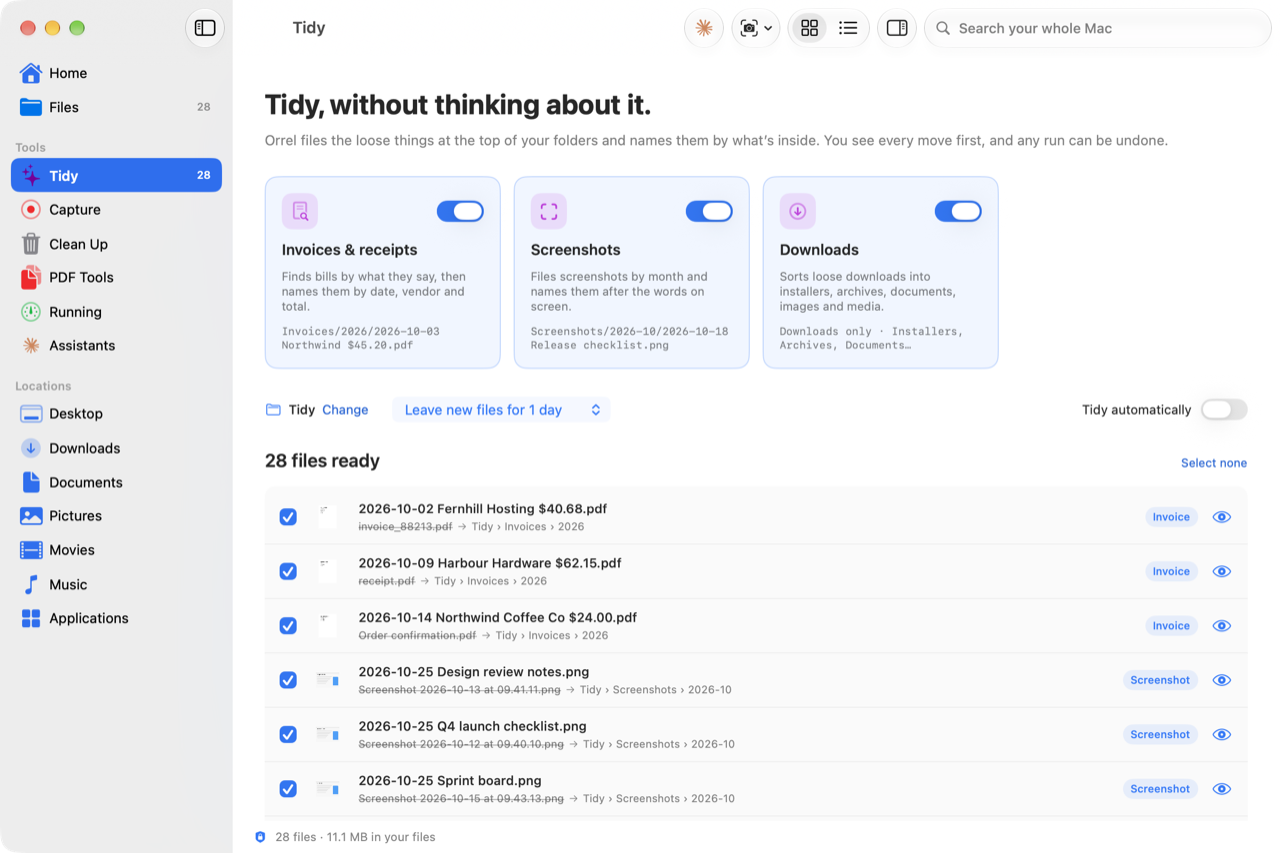
Files named and filed by what’s inside them.
Three templates read each file on your Mac and propose where it goes. You see every move first, and any run can be undone. Orrel never deletes and never overwrites.
Exact duplicates matched by their contents, large files, old installers and forgotten downloads, listed for review. What you pick goes to the Trash, so Finder’s Put Back still works.
Every port your projects listen on, with the folder, the tool and what started it: Claude Code, Codex, Cursor or a terminal. Stop leftovers in one go, and see CPU and memory per app.
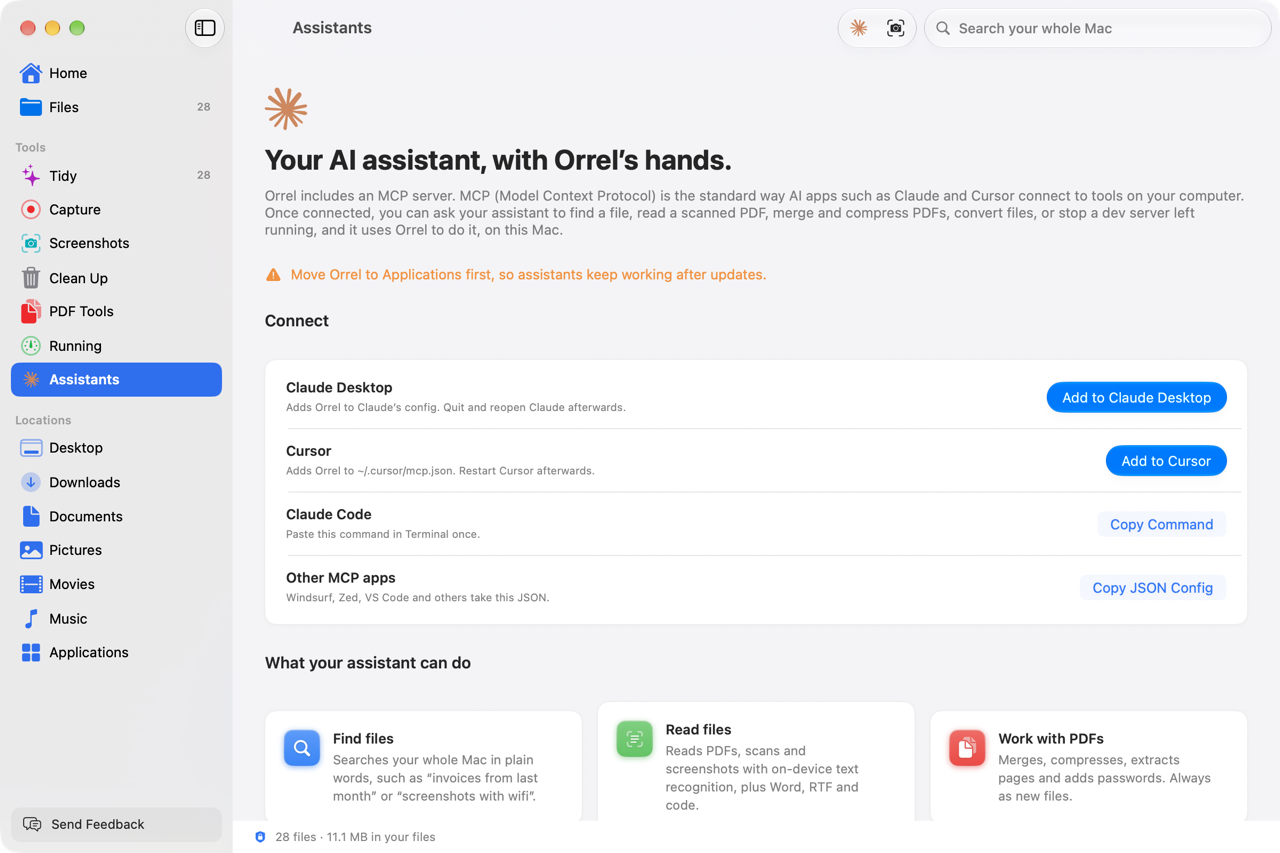
Orrel includes an MCP server with 12 tools. Connect Claude Desktop or Cursor in one click, or Claude Code with one command. Your assistant can search and read your files, merge and compress PDFs, convert files and see what’s running. It asks before anything writes or stops.
“Find the hosting invoice I downloaded last month and tell me the total.”
“What’s running on localhost? Stop anything left over from yesterday.”
“Merge the three lease PDFs in Downloads, then compress the result.”
Make a copy of Claude, Chrome, Cursor, VS Code or another app built on Chromium, Electron or Firefox, each with its own sign-in, settings and history. One for work and one for personal, or one per client. Each copy has its own name and labelled icon in the Dock, takes almost no disk space and opens without Orrel running. The original app isn’t changed. App Store apps can’t be copied.
CWorkClaude WorkIts own sign-in · in the Dock beside ClaudeOpen
CClientChrome AcmeIts own bookmarks, passwords and historyOpen
CPersonalCursor HomeIts own settings and extensionsOpen
Built like a Mac app should be
Your files stay on your Mac.
Orrel reads, names, converts and searches with what macOS already has on board. The only things it sends are an update check and a one-time licence activation.
On-device
Search, text recognition, invoice naming, conversion and duplicate checks run locally. Nothing is uploaded.
No account
No sign-up and no analytics in the app. Your licence key is all you need.
Notarised and signed
Signed with an Apple Developer ID, notarised by Apple, with signed updates built in.
Undo everything
Every tidy run can be put back from History. Clean Up only moves files to the Trash.
In the menu bar
Capture, convert, tidy now and open localhost servers without opening the main window.
Part of Finder
A Quick Action, a Dock drop target, a Quick Look extension and Shortcuts actions.
The everyday half of four apps, in one app, paid once.
Each specialist app goes deeper in its own job. Orrel covers the version of each job you do every week, shares one search and one menu bar item between them, and costs $15 once.
Prices from each developer’s own site, checked between 25 October and 4 November 2026, in US dollars before tax. If you need custom rules, cloud sharing or full PDF editing, the specialist app is the better choice, and our comparison pages say so.
Pricing
Try everything for 3 days. Then pay once.
The trial includes every feature, with no card and no account. After three days Orrel needs a licence. Pick the one that covers your Macs.
Checkout is handled by Stripe. When you’ve paid, you’ll see your licence key and an Activate in Orrel link. A licence activates online once on each Mac. When the trial ends without a licence, Orrel locks; files it has already moved stay where they are.
Download Orrel and use everything for 3 days. There’s no card to enter and no account to make. When the trial ends, Orrel locks until you enter a licence. Files it has already moved stay where they are, in ordinary folders you can open in Finder.
Which licence do I need?
One licence per number of Macs you use yourself: $15 for one Mac, $30 for three or $50 for five. Each is a one-time payment with updates included. If you have a desktop and a laptop, the three-Mac licence covers both with one spare.
How do I activate my licence?
After checkout, the confirmation page shows your licence key and an Activate in Orrel link, which opens Orrel and activates it. You can also paste the key into Orrel’s settings. Activation needs an internet connection once on each Mac; after that, Orrel doesn’t need one.
How do I move my licence to a new Mac?
Free the old Mac from Orrel’s settings, then activate the key on the new one. If the old Mac has already gone, email hello@orrel.app with your licence key.
I’ve lost my licence key.
Your key is shown on the confirmation page after checkout, so copy it somewhere safe, such as alongside your Stripe receipt. If you’ve lost it, email hello@orrel.app with the email address you paid with.
Can I get a refund?
If Orrel isn’t right for you, email hello@orrel.app. The 3-day trial is there so you can check it does what you need before you pay.
What won’t Orrel touch?
Tidying only moves loose files at the top of Desktop and Downloads. It never touches subfolders, skips partial downloads, leaves new files alone until your waiting period has passed, skips files that changed after the preview and never overwrites a file that’s already there. Clean Up moves files to the Trash only after you’ve reviewed them. Nothing is deleted outright.
What can’t Convert do?
It can’t make MP3 files, because macOS has no MP3 encoder, and it doesn’t read MKV or WebM video. Word and Markdown files convert to PDF, but nothing converts into Word. Every conversion writes a new file beside the original.
Which permissions does Orrel ask for?
Orrel isn’t in the App Sandbox, so it relies on macOS permissions. Full Disk Access is optional: it lets Orrel search everywhere. Without it, macOS keeps some folders out of reach and asks before Orrel opens Desktop, Documents or Downloads. Screen Recording is needed for screenshots, recording and Copy Text from Screen. You can change either in System Settings › Privacy & Security.
Does it tidy when Orrel is closed?
No. Automatic tidying runs only while Orrel is open. It can sit in the menu bar and open at login if you want it running.
Does Orrel connect to the internet?
Only to check for updates and to activate your licence once on each Mac. Your files and their text never leave your Mac. If you connect an AI assistant, what Orrel’s tools return is sent to that assistant as part of your conversation.
Is it on the Mac App Store?
No. Orrel is sold directly from this website. The download is signed with an Apple Developer ID and notarised by Apple, and updates are signed too.
Which Macs does it run on?
Orrel needs macOS 14 or later. It’s designed for macOS 26, where it looks and works best. Recording your microphone and click highlights need macOS 15 or later.
Was Orrel called Nook?
Yes. Orrel was called Nook while it was being built. It’s the same app with a new name.
Guides
The built-in way first, then Orrel’s.
Plain guides to everyday Mac jobs. Each shows what macOS already does, how Orrel does it, and where Orrel stops.